Vibecoding a local, layout-aware PDF reader
This tutorial is a guide to scoping and building a local reader for academic PDFs with an AI coding partner. It is not a recipe for one particular codebase. The exact tools will change, but the design questions remain useful: what should be read aloud, how should the reader relate to the original page, and what does “private” mean for your documents?
For the story behind this project, see the accompanying blog post.
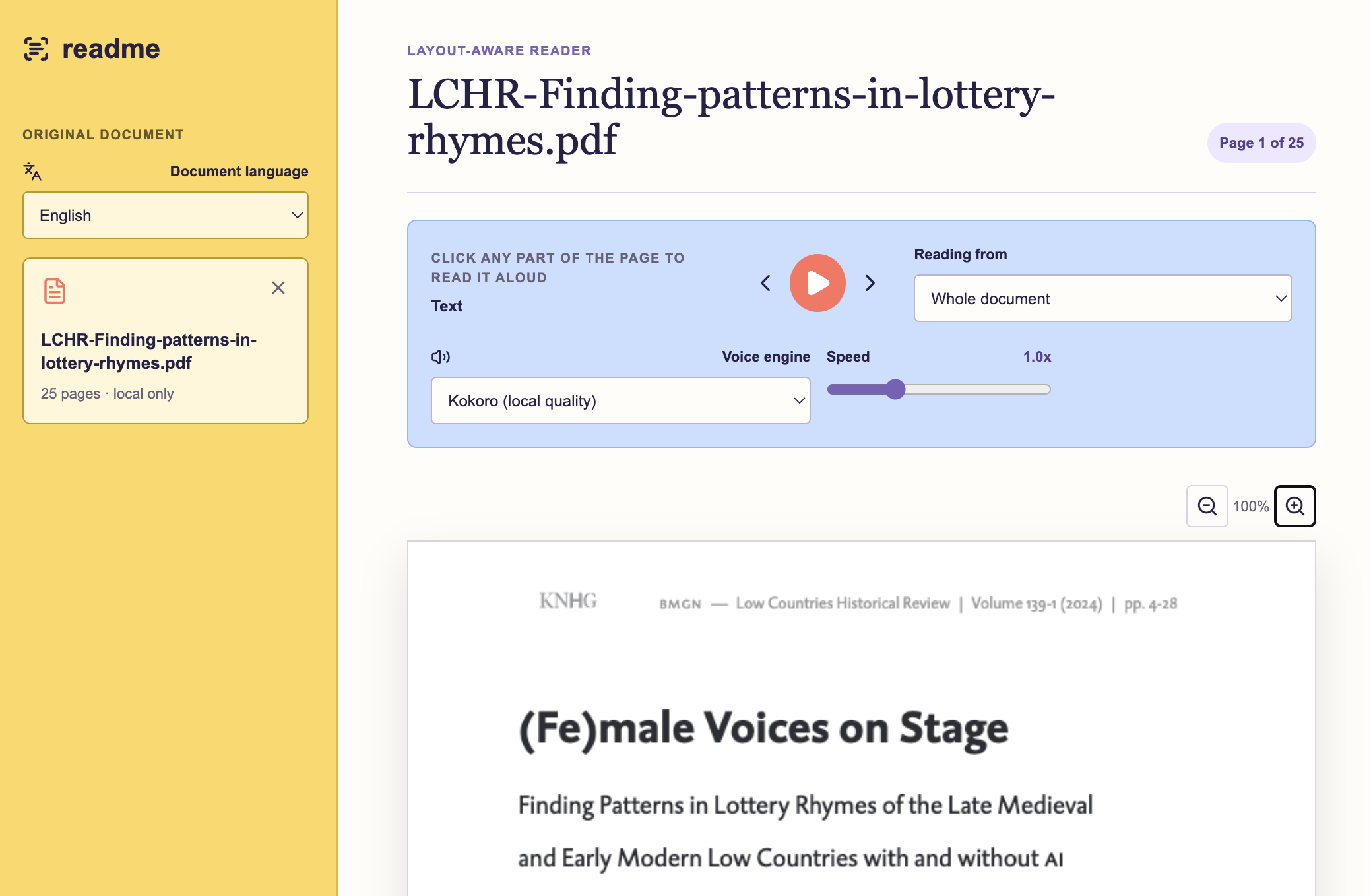
Start with the reading experience
Before choosing a framework or model, describe the experience you want in plain language. For this project, the essential requirements were:
- Upload a PDF (and, later, a Word document).
- Keep the original page visible rather than replacing it with a reflowed text view.
- Click a paragraph or section to start listening there.
- Highlight the sentence currently being spoken.
- Let the reader pause, resume, change speed, and move between pages.
- Process documents locally where possible, because academic documents can be unpublished or sensitive.
This is a much better starting point than “build me a PDF reader”. It gives you a way to judge every technical suggestion. If a proposed feature does not improve the reading experience, it can wait.
I want to build a local-first reader for academic PDFs. It should preserve the original page, detect headings and paragraphs, let me click a text region to start playback, and highlight each spoken sentence. Help me define the smallest usable version first. Ask me questions about privacy, document types, languages, and what should be skipped before proposing an architecture.
Treat layout as data
Raw PDF text extraction is rarely enough for scholarly articles. A two-column page may be extracted in the wrong order; captions and footnotes can be mixed into paragraphs; a reference list can become part of the main text.
Use a layout-aware document processor to identify both what is on a page and where it is. The output should include, at minimum:
- page number;
- region type, such as heading, paragraph, figure, table, note, or reference;
- bounding box coordinates for each region;
- text for the region; and
- a reading order.
Render the original PDF in the browser and place transparent click targets over the text regions. This keeps the visual structure that makes a paper legible, while still giving the app structured text for playback.
Layout models make mistakes. Provide a way to select another region, stop playback, or exclude a troublesome area. “Detected paragraph” is a helpful suggestion, not an unquestionable fact about the document.
Define rules for spoken text
What is readable on a page is not always pleasant to hear. Write down the transformation rules you want before asking the coding agent to implement them. For example:
| On the page | In speech |
|---|---|
(Smith, 2020) |
Skip it |
Smith (2020) argues... |
Read “Smith argues…” |
| superscript footnote marker | Remove it |
| figure or table | Pause and let the reader inspect it |
| references section | Skip by default, with an option to include it |
These are product decisions, not merely cleanup steps. Keep them configurable if your reading needs vary across disciplines.
Build playback around sentences
Sentence-level playback is a practical unit for a reader: it allows accurate highlighting, responsive pause controls, and small audio requests rather than one long file.
The basic loop is:
- Split the selected text region into sentences.
- Generate or request audio for the current sentence.
- Highlight that sentence in the PDF view while it plays.
- Prepare the next sentence in the background.
- Move to the next sentence or page only if playback has not been cancelled.
That final condition matters. A common bug in interactive audio is an old callback continuing after the user has paused, selected a different paragraph, or changed pages. Give each playback session an identifier and ignore results that do not belong to the current session.
Keep the first usable page fast
Waiting for a complete paper to be processed makes the reader feel broken, especially for long articles. Process pages incrementally instead:
- Analyse and render the first page.
- Let the reader select and play its regions.
- Continue processing later pages in the background.
- Before playback crosses to a new page, make sure that page is ready.
This approach also makes failures easier to understand. If page 14 contains an unusual table, it should not prevent someone from reading page 1.
Choose a voice with the interaction in mind
A voice can sound excellent in a short demonstration and still be unsuitable for a reader if it takes too long to respond. Test voice quality alongside latency.
For a local setup, ask your coding partner to compare options against these questions:
- Can it run on your machine without sending document text to a third party?
- How long does it take before a selected sentence starts playing?
- Does it support the languages you need?
- Can it prepare the next sentence while the current one plays?
- What happens when the service is unavailable?
Start with the browser’s built-in speech if it helps you test the rest of the interaction. Replace it only once the reading flow works. In this project, a local Kokoro voice model became a better fit than the initial browser voices because it improved quality without making each click feel slow.
Test with papers that misbehave
Do not validate a layout-aware reader using only a clean, single-column PDF. Make a small test set with:
- a two-column article;
- a page with footnotes and long citations;
- a paper with large tables or figures;
- a scanned or otherwise imperfect PDF;
- a document in each language you intend to support; and
- a long article that forces several page transitions.
For each document, test both the visible result and the audio result. Can you click the intended paragraph? Does speech follow the visible order? Does pause really stop playback? Does the page change at the right moment? Can you recover after selecting a different section?
Use the coding partner as a design partner
The most productive prompts are often observations from using the app, not implementation requests. Here are some examples:
This works, but it still feels slow when I click a paragraph. Help me identify where latency is coming from and suggest the smallest change to make the first sentence start faster.
The audio changes page correctly, but the PDF view sometimes stays behind. Describe the state transitions involved and add guards so an old page render cannot overwrite the current view.
Tables should not be read as a stream of cells. When a table is reached, pause playback and show a clear message explaining why.
Ask for explanations alongside changes, and test one behaviour at a time. You do not need to understand every library in advance, but you do need to keep the desired behaviour in view.
Know what remains difficult
This kind of reader will not be perfect. Equations, complex tables, scanned documents, multilingual text, and unusual page layouts are hard problems. “Local-first” can also involve trade-offs in installation time, disk space, and hardware requirements.
That is not a reason to abandon the idea. It is a reason to build a narrow first version, name its limits clearly, and improve it using the papers you actually read. A useful personal tool does not have to solve every PDF.