I vibecoded myself an academic PDF reader
As a researcher, reading academic papers is a key part of my job. Over the years, I’ve noticed I get less distracted when I can read a paper and listen to it at the same time. I regularly use text-to-speech software for that, but my quest for the perfect reading aid is still very much ongoing. NaturalReader has long been my preferred option. It is good at recognising the structure of a PDF, but its free voices sound rather mechanical and are painful to listen to for more than 10 pages.
So for my first vibecoding experiment, I tried to make something for myself: a reader that preserves the page of an academic article, lets me choose the part I want to hear, highlights sentences as they are read, and uses a more pleasant voice.
I called it readme and I think it looks very pretty.
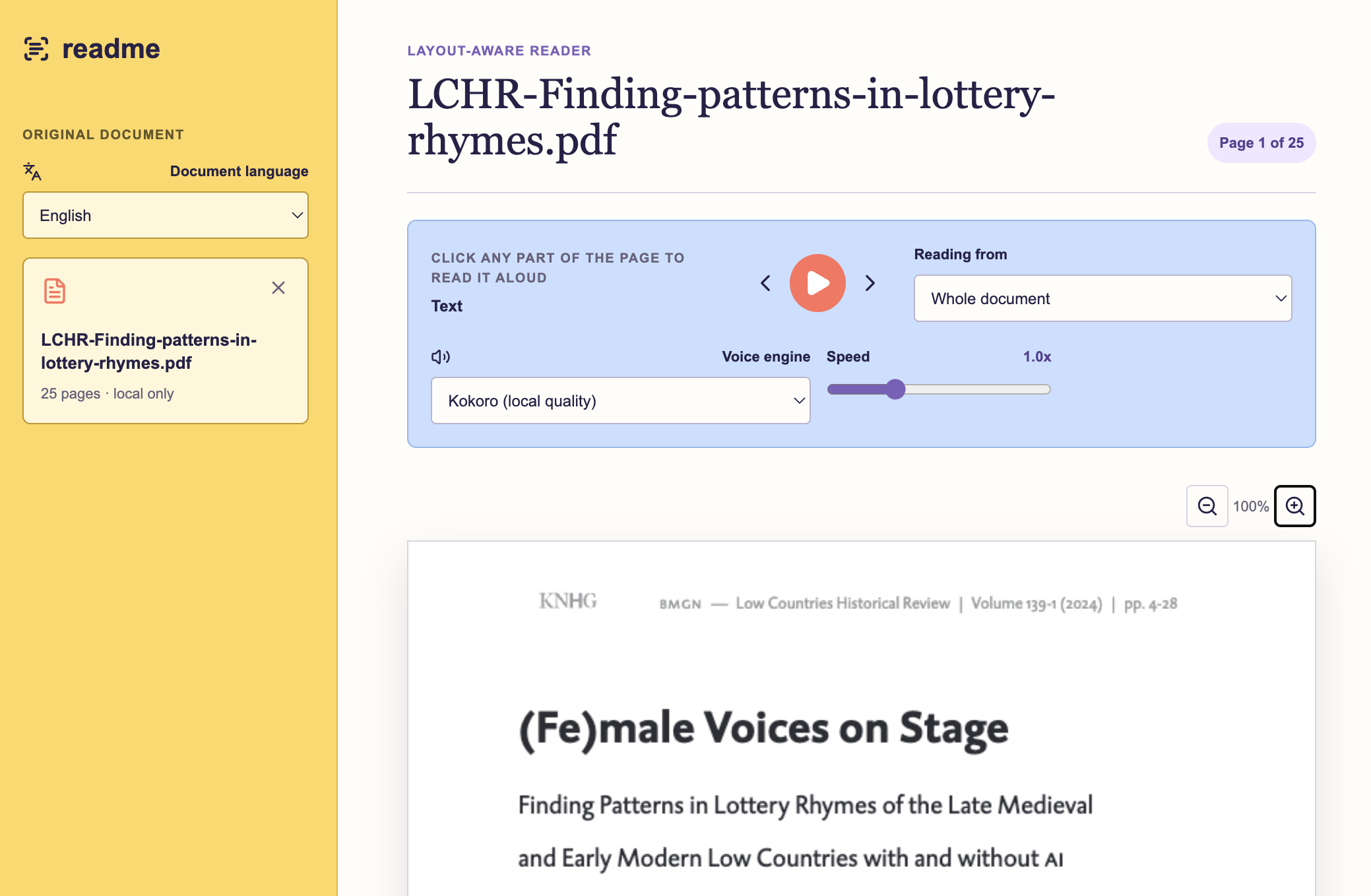
readme interface: an academic article is displayed alongside playback controls and clickable reading regions.The problem is not just text-to-speech
The first version of the idea sounded almost too simple: upload a PDF, select a paragraph, and press play. But academic PDFs are not plain text files. They have columns, headings, figure captions, tables, running headers, footnotes, page numbers, equations, and reference lists. A reader that simply extracts every line of text can produce wonderfully nonsensical results: half a sentence from the left column, a footnote and the continuation of a caption from the right. If you’re particularly unlucky, you’ll even get to hear every number in the accompanying table up to five decimal places.
That is why layout recognition became central to the project. Rather than turning the article into a clean but generic text view, readme keeps the original PDF page on screen. A local layout-processing service identifies regions such as headings, paragraphs, figures, tables, notes, and references, and establishes a reading order. The text regions become clickable on top of the original page.
I deliberately limited it to that. Despite Codex’s many offers—ever more ambitious than I am—I did not let the app summarise papers, answer questions about them, or turn reading into a productivity dashboard. All I wanted was something that helps me listen to a document while keeping the document itself in view.
Building a useful first version
I built the application with Codex in a separate project. Before writing much code, we worked through what a genuinely useful minimum version would need: PDF and Word uploads, a way to start from a selected section, English and Dutch controls, playback speed, a locally saved reading position, and none of the semantic enrichment that Codex so desperately wanted to add.
The first version used browser text-to-speech. It was a sensible place to start, because it made the reading flow testable quickly. It also made the limitation obvious: voice quality is part of the experience, not a decorative extra. We later moved to a local Kokoro voice model for English. An earlier attempt with an even better model sounded promising, but was prohibitively slow for an interactive reader.
The key design choice to make the app truly work turned out to be generating speech for one sentence at a time. It allowed the app to prepare the next sentence while the current one played, and it gave the interface a clear unit to highlight. When a sentence is spoken, the matching sentence on the page is softly marked. The reader can still scroll around manually.
The small details that make reading feel better
Once we had a first draft in place, it was time to address the issues that had been bugging me for years of using suboptimal text-to-speech software. I made sure my app:
- skipped parenthetical citations such as
(Smith, 2020). - kept the author name in narrative citations such as
Smith (2020)but omitted the year. - removed superscript footnote markers before speech.
- paused playback for tables and figures, so that I could visually inspect them instead of hearing an awkward linear rendering of a layout.
- processed the PDFs page by page, so the first page could become usable before the whole article was ready.
None of these choices is universally correct. A researcher studying citation practices may very much want citations to be read out. The important thing is that they are reading choices, rather than accidental side effects of text extraction.
The verdict: did I feel the vibe?
First things first: what did it cost me in terms of time and actual money? I’m on a ChatGPT Business plan with Codex that currently costs me (or, to be honest, my employer) €20 a month. This project took me around three hours to build and used about 25% of my weekly Codex token allowance on 5.6 Terra. While the app I produced isn’t perfect, it does its job well enough to be useful to me personally, so I’m inclined to consider it a good investment of time and money.
This is especially the case because I’m not a software developer and I simply would not have been able to create an app like this from scratch even if I had been given ten times the allotted time and money. The useful part of vibecoding was not asking for a finished app in a single prompt. It was using an AI coding partner to turn reactions into changes. I could say, “this feels slow” or “the boxes are too clunky”. Those are not implementation specifications, but they are meaningful descriptions of how a tool feels to use.
That being said, the collaboration was not self-steering. Left to its own devices, Codex repeatedly failed to produce usable document-layout recognition. I had to research the available libraries, decide that Docling was the right fit, and explicitly ask it to use that library. The same was true for speech: I had to look up and compare text-to-speech options myself, then direct the project towards a local Kokoro model. Without that research and those choices, the app would have been much worse.
Some things also remained stubbornly unsolved. When the reader reaches the end of a page, the voice can continue with the next page, but the PDF viewer does not reliably follow it. I described that problem several times, in several different ways, and the attempted fixes did not work. This was a useful reminder that an AI coding partner can make rapid iteration possible, but it does not guarantee that every bug will yield to another prompt. In addition, I’m utterly incapable of judging the app’s quality on a technical level. My colleague Yoshi - a true Software Engineer - will write more on that soon.
All in all, I definitely see the value of vibecoding for people like me: entry-level coders who know which general frameworks would be best for solving a particular problem, but aren’t sufficiently well versed in web development to turn everything into a fully functioning app. This holds particularly for personal projects like mine: readme is not a general solution for every kind of document. Layout recognition will make mistakes, especially with unusual PDFs, complex tables, or mathematical notation. A locally run tool also asks more of the computer than a simple web service does. The page-following behaviour is not yet reliable, either. Even so, it is already a better fit for much of the way I read academic papers: I can see where I am, choose what to hear, and let a less robotic voice carry some of the cognitive load.
If you would like to try this kind of project yourself, the accompanying tutorial lays out the design decisions, prompts, and tests that helped turn the initial idea into a usable reader.